

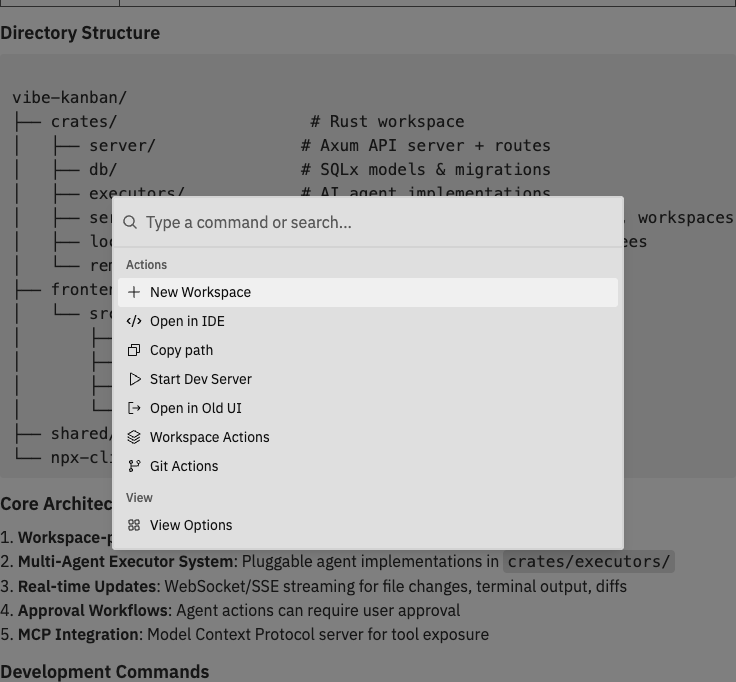
Opening the Command Bar
You can also click the command bar icon in the navbar.
Available Commands
Quick Actions
Access these from the root command bar page:Workspace Actions
Manage the current workspace:Git Actions
Perform git operations:View Options
Control panel visibility:Diff Options
Customise the diff viewer (available when changes panel is visible):Repository Actions
For workspaces with multiple repositories, manage individual repos:Keyboard Shortcuts
Global Shortcuts
Command Bar Navigation
The command bar organises commands into pages:- Root - Quick actions and navigation to other pages
- Workspace Actions - Workspace management commands
- Git Actions - Version control operations
- View Options - Panel visibility toggles
- Diff Options - Diff viewer settings
- Repo Actions - Per-repository commands (multi-repo workspaces)
Start typing to search for any command. The command bar uses fuzzy matching, so you don’t need to type the exact command name.
Power User Tips
Most useful commands to memorize
Most useful commands to memorize
These commands will speed up your workflow significantly:
Fuzzy search tricks
Fuzzy search tricks
The command bar uses fuzzy matching - you can type partial words or abbreviations:
nwmatches “New Workspace”cprmatches “Create Pull Request”tog prevmatches “Toggle Preview Panel”rebmatches “Rebase”
Quick panel toggling
Quick panel toggling
Use the command bar to quickly show/hide panels without moving your mouse:
- Press
Cmd/Ctrl + K - Type
toggle - See all toggle options
- Select the panel you want to show/hide
Context-aware commands
Context-aware commands
Some commands only appear when relevant:
- Push only shows when you have unpushed commits
- Rebase only shows when you’re behind target
- Repo Actions only shows in multi-repo workspaces
- Diff Options only shows when Changes panel is visible
Related Documentation
- Interface Guide - Learn about the workspace layout and panels
- Git Operations - Detailed guide to git commands
- General Settings - Application settings and preferences